Showing posts with label The Thin Line Alpha. Show all posts

Wednesday, January 15, 2020

Best Pals- Thin Line Alpha Cut File- Audrey Yeager

Hi everyone!  I went through the store to find a fun alpha to use on my boy page (and there are LOTS to choose from!  I went with The Thin Line Alpha and cut the word "Pals" on my page below:


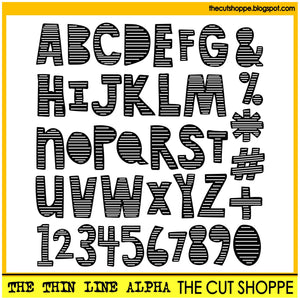
The Thin Line Alpha

This page was also a stash buster!  I first went through my stash to find some colors that I wanted to use.  I was struggling at first with a page design, but one of my goals was to use more patterned paper.  So I just layered some big rectangles of the patterns I liked with the photo on top in a frame.


Then I fussy cut out some stars and others from my stash.


Circle embellishments on the edges help soften the flow of the design.


Some details with border stamps and machine stitching.


Finally, the cut file I used to cut the word "Pals".  I was worried that cutting the letters this size with all the detail they have would be tricky, but they cut so beautifully from patterned paper!


Thanks so much for looking and go check out all the Alpha Cut Files in the store!


Wednesday, August 22, 2018

Good Life | Kelly Janes

Hey there friends! Kelly here today to share a new 12x12 scrapbook layout using the Thin Line Alpha Cut File.


I started in Cricut Design Space by slicing out the letters "M" & "J". I then inserted two score lines. I sized & arranged the score lines to create a grid in the center of my 12x12 background. I then converted the score lines to "write" so the Cricut would draw straight lines on my background.


I cut the letters from the Thin Line Alpha Cut File in black cardstock & positioned them in the upper left & lower right quadrants of the grid. I also added hand stitching over the drawn lines. I then added my photos in the remaining two quadrants. I added layers behind my photo & embellishments in all of the quadrants for extra fun!!


Thanks so much for spending part of your day with me & remember to visit The Cut Shoppe Etsy Store to check out all of the cut files & digital collections!


Thursday, December 17, 2015

Put a Little Love in Your Heart

Do you ever work on a layout, that you put a lot of love into?  The one I'm sharing today, definitely took a lot of love because of all of the hand stitching!!  I wanted to create a string art look in the background, using our new The Thin Line Alpha cut file.  It did take a lot of work, but I had fun doing it and really loved that it turned out the way I wanted it to.


https://www.etsy.com/listing/260903158/the-thin-line-alpha-cut-file-includes?ref=shop_home_active_2

Here's a look at how I used the cut file to create the string art design.  First, I opened The Thin Line Alpha and went to Object then down to Trace.  With the Trace window open, I clicked Select Trace Area and then used my mouse to highlight the whole alpha.  Next, I unchecked the High Pass Filter box and clicked Trace under Apply Trace Method.  This gives me the cut lines for the alpha set.  To separate the alphas, I clicked Release Compound Path under Object.  This gives me the ability to choose just the letters that I want to use.  So I highlighted over the L, O, V and E individually and moved each one aside.


Since I didn't need the rest of the alphabet, I just deleted the other traced letters.  Then I moved the word Love to the center of the mat in Silhouette Studio and enlarged it.  Once I had it at the size I wanted, I clicked the Cut Settings tool on the right hand side of the tool bar of Silhouette Studio.  Then I selected each letters outline and clicked No Cut.  I only wanted to cut the inside lines of each letter on the Cameo.


After the inside lines finished cutting, I went back to the Cut Settings tool and changed the outside lines back to cut.  Then I just deleted the inside lines in each letter.


The last step, was drawing a box around the mat in Silhouette Studio, using the box tool on the left hand side.  Instead of cutting this time, I placed a sketch pen in the Cameo and drew the lines as a template for my stitching.


I really love using this technique with the sketch pens to create stitching templates and mix it with cutting on the Cameo.  It creates a fun and unique look on your layouts!

And if you would like to pick up the new The Thin Line Alpha, as well as our other new sets that are now available, make sure stop by The Cut Shoppe Etsy store.  You can still shop with the Discount Code MERRY31 through December 31st to save 31% off of your purchase!!

https://www.etsy.com/shop/TheCutShoppe

Supplies:  The Thin Line Alpha cut file:  The Cut Shoppe; Patterned Paper, Wood Veneers, Bits & Pieces, Cork Embellishments & Stickers:  Elle's Studio; Thickers:  American Crafts; Enamel Dots:  My Mind's Eye; Tiny Attacher:  Tim Holtz; Die Cut Machine:  Silhouette Cameo

http://www.ashleyhortondesigns.com/