Tuesday, March 17, 2015

Sunshine

Happy St. Patricks Day, everyone! Allie with you today, and I have non-green layout to share with you today using the really fun Geometric Graffiti background cut file!


I am crazy about the super fun triangles!


To create this layout, I cut the Geometric Graffiti background from white cardstock. While it was still on the mat, I painted it with watercolors. Once it was try, I lifted up the negative space and used it as a stencil to place the watercolored triangles on another piece of white cardstock.


 I added my photo and embellishments, and the layout was done! I wanted to keep it pretty simple to focus on the fun background!


Thank you for letting me share my layout with you, and I hope you have a fantastic day!


Monday, March 16, 2015

We Are Lucky

Mary-Ann here with you today!  I am hesitant on sharing my layout.   
Do you ever feel challenged by what you have as a vision and trying to apply that to how you create with paper?  My idea was to create a collage showcasing my boys crazy faces he made with a crazy app on my phone.  Maybe I printed the collage too large?  Maybe it was the color choices of my papers?  There is something that did not translate when I created this layout.  I share this with you today, to show you that you are not alone, hopefully I am not alone. Creating is not always perfect and sometimes results differ from what you have in mind, and that is ok.  I still like the result.
Maybe I will try my vision with a different collage, printing the pictures smaller, leaving more space for embellishments.  But I think this layout is a perfect way to showcase just how crazy this kid can be.  So, join me as I take you through my layout journey.  Or bail now, it is up to you, lol!!


I started by printing my photos through my Silhouette.   You can maneuver your photos to any size, order or shape you want when doing it this way.  I chose my papers, then the cut files I wanted to use.  I used the Geometric Graffiti Background for a subtle white background, and backed it with a delicate polka dot paper.  


The "lucky" part of my title is from The Lucky Charm cut file.  This was the word that I wanted to highlight so I made it differ from the rest of my title and doodled inside.


Plastic stars and wood veneer pieces complete my design. 
 I do thank you for taking a look and letting me share my no so perfect layout
 that actually turned out pretty cool.  

Here are the cut files that I used for my layout:


See you next time. 


Sunday, March 15, 2015

This is 40


Hello there, it's Cara and since I recently had a big birthday I decided I needed to document it with one of my favourite things: butterflies :D    ...that and R2D2 ;)


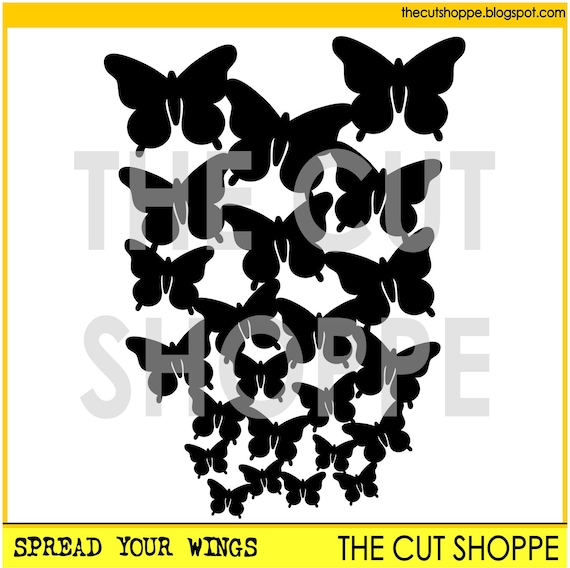
I used the 'Spread your Wings' cutfile, which just might be one of my favourite cutfiles in the whole shoppe :D

The Spread Your Wings cut file, can be used as a background design for your scrapbooking and papercrafting projects.


I also used the 'today' from the free cutfile set that was included in the last Cut Shoppe newsletter.  You can sign up for the newsletter here.

Of course I can't forget the little 'awesome nerd' I just felt like it was perfect for this photo since I'd rather wear an R2D2 T-shirt than a blouse anyday!


The Awesome Nerd cut file is a title phrase, that can be used on your scrapbooking and papercrafting projects.


Have a fantastic day!


Saturday, March 14, 2015

Fly with me

Hello everyone, it's Danielle here with you today. I have made a layout with the new Geometric Graffiti background cut file, which comes in 12x12 and 8.5x11. I used the 8.5x11 version and placed it on the left side of my page.

All papers and embellishments are from the Crate Paper Notes & Things collection. I just had to back up this cut file with the Schedule paper, as it has the same triangle pattern as the cut file. I also added some wood veneers from Chic Tags.


Thank you for stopping by and have a creative day!


Thursday, March 12, 2015

With You

Hi again!!  It's Ashley, and you know what Thursday's mean, here, around The Cut Shoppe...that's right, new cut file sets in the Shop!  We've got you covered this week with a Lucky themed set, since St. Patrick's Day is coming up, a new Tag set and a funky background cut file!  For my layout this week, I chose to work with the rainbow from the Lucky Charm cut file set and add some color with acrylic paint!


I traced the rainbow and cut seven of them from White cardstock.  Then I used acrylic paints to paint each of the cut files, a rainbow color.  Before adding the rainbows to the background paper, I splattered coordinating watercolors where each of the cut files would be placed.  This was such a fun technique, and could be used with a lot of different cut files from The Cut Shoppe!

You can find out more about my process for putting this layout together, by checking out my new Process Video!


And when you stop by to visit the Shop, you'll find all three of these new sets!

https://www.etsy.com/shop/TheCutShoppe?ref=hdr_shop_menu

Supplies:  Lucky Charm Cut File:  The Cut Shoppe; Acrylic Paint & Watercolor Paint:  Reeves; Patterned Paper & Thickers:  American Crafts; Flair Buttons:  A Flair for Buttons; Paper Clip & Enamel Dots:  Freckled Fawn; Wood Drop Stickers:  Pinkfresh Studio; Stickers, Bits & Enamel Dots:  Simple Stories; Color Shine:  Heidi Swapp; Die Cut Machine:  Silhouette Cameo

http://www.ashleyhortondesigns.com/

Wednesday, March 11, 2015

I am...

Hey there, Amy here to share a layout I created using 12x12 Hello Love cut file from The Cut Shoppe. I cut out the 12x12 file, then trimmed it to fit onto my layout.


Once I got my file cut I grabbed the March kit from Paper Camellia, which is filled to the rim with the amazing I Am line from Simple Stories, and got to work. Here's my layout.


Here are some closeups.


You can see here I used mist to "paint" in some of the hearts.


 I used my exacto-knife to trim out part of the gold heart on the black striped paper to slip the tag behind it. I also traced my journaling to fit inside the heart.


Thanks for stopping by the blog today!


Tuesday, March 10, 2015

Find the Good in Everything...

Hi everyone!

It's Tarrah back here with you and today I have a new layout to share using one of the recently released Cut Shoppe Files! The Spread your Wings cut file is one of my recent new favourites!

I used the gorgeous American Crafts Serendipity collection to create my layout, I loved the ombre pink paper from this collection...I knew I wanted to use the Spread Your Wings cut file with this paper to give a descending effect....  
The featured cut file on my layout....'Spread Your Wings'...


I also used 2 of the free cut files found in the latest Cut Shoppe newsletter on my layout, I used the middle heart and the 'Today' word on white cardstock....  sign up for the newsletter here to receive free cut files!


 I used a couple of cute resin embellishments too, the bow and the diamond...
Thank you for joining me on The Cut Shoppe blog today...I hope I have inspired you to buy some cut files to add to your next project!