Showing posts with label Guest Designer. Show all posts

Monday, January 13, 2020

GUEST DESIGNER | Jessica Upton

I am so excited to introduce you to our January Guest Designer!  Please welcome the awesomely talented, Jessica Upton owner of Color Cast Designs!  I have had the chance to work with Jessica and she is the sweetest, and I love the fun products in her store.  She also shares some amazing work on Social Media and I was so happy when she said she could join us this month!

https://www.instagram.com/jessica_upton/

Let's get to know a little bit about Jessica, before we see what she created!

I’m living my best life in the country near Colordo Springs with my husband and 3 kids. My oldest is graduating from High School this year, so much change heading our way as she leaves the nest. I have been scrapbooking for 17 years and about 6 years ago made my favorite hobby into a business, Color Cast Designs! Other than scrapbooking, I love photography, camping, off roading, reading and all things that involve horses!  


https://thecutshoppe.com.co/search?type=product&q=messy+circles

I saw The messy circles and knew immediately that I wanted to use them to make a background for a spread in my daughters senior photo album. I contemplated coloring them, but decided to keep them white as I really loved how they popped on the coral background.


I also used a few digital stamps to make my own embellishments to add onto a few circles. I love the impact of the background with my full size photo.


Thank you so much for having me as a guest! 

Thanks for sharing with us Jessica!! It's always fun to see the cut files used on different project types and the Around and Around cut file looks great in your Traveler's Notebook!.  Make sure you are following Jessica on Social Media.  You can find her HERE on Instagram and you can also check out her store, Color Cast Designs

https://www.instagram.com/ashleyhorton75/
 

Monday, November 11, 2019

GUEST DESIGNER | Flora Farkas

We are so excited to introduce you to our November Guest Designer, Flora Farkas!!  Flora is a former Design Team member and we love everything she creates!  It's exciting to have her with us today, and getting to see what she did with the This Much Cut File on her gorgeous layout.

https://www.instagram.com/floramfarkas/

Hi Ladies, I am super happy and excited to be back on the awesome The Cut Shoppe blog. This blog and Ashley's cut files always have a special place in my heart. I am honored to be asked to be a guest designer. I must tell it was difficult to pick one cut file for today's post, but in the end I chose This Much cut file.


I love to back large titles even if it takes time, the result is worth all the effort. I backed the enlarged title with a Pink Paislee - Truly Grateful rainbow paper. I usually glue behind the cut file small paper scraps. Once the liquid glue dries I cut away the undesired parts.  


I also added fussy cut rainbow leaves using tone on tone technique. I band them to create 3D look and adhered some of them with foam tape. Next to the photo I placed Pink Paislee - Truly Grateful Stickers, Ephemera pieces and Wood Buttons. 
 
 
I just love the eye-catching big title, it makes the whole design stunning. I hope you will try out the This Much cut file !


That was it for today! I hope you enjoyed to see my new scrapbook layout. Thanks for the great opportunity Ashley! I love all The Cut Shoppe cut files and can't wait to work with another one.
 
Thanks so much for sharing with us Flora!  We love your gorgeous layout and the way you used the This Much Cut File.  Make sure you are following Flora on Social Media.  You can find her HERE on Instagram and her shop, Pink and Paper Shop

https://www.instagram.com/ashleyhorton75/

Monday, October 14, 2019

Guest Designer | Jodie King

We are so excited to welcome Jodie King as our October Guest Designer.  Jodie creates gorgeous layouts in her Traveler's Notebooks, and we couldn't wait to see what she did with some of our Cut Files!  Let's get to know a little bit more about Jodie, and then check out all of the details on the layout she created for us, today! 

https://www.instagram.com/heartpeonies/


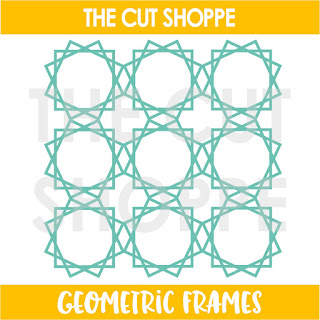
Hi friends!  It’s Jodie King with you today and I’m super excited to be The Cut Shoppe’s guest designer for October!  I’m from the east coast of Australia and have been scrapping for about ten years now.  My favourite projects to create are travellers notebook layouts, mini albums and project life spreads, and I love using cut files in all of them.  I had a hard time choosing from all of the beautiful designs in The Cut Shoppe store, but I have loved the Geometric Frames since forever so I decided to adapt them to suit a Traveler's Notebook background.


https://thecutshoppe.com.co/products/geometric-frames?_pos=1&_sid=1ab0be25c&_ss=r

Firstly I resized the cut file to be 6 inches high.  I have the basic edition of Silhouette Studio so I usually use the png file and trace it to create my cut lines.  I knew I only wanted two columns out of the three so I traced just a little past the edge of the second column.  I sent that to cut on white cardstock, and trimmed the little excess pieces from where the third column started with my scissors.


I’ve used a photo of me with a beautiful horse I met on our daughter’s partner’s family farm recently, and the colours worked so well with the Again & Again collection from Pink Paislee.  I used the 6x8 paper pad and trimmed different patterns and colours to back each of the geometric shapes.


Although I love the subtle look of white cut files on a white background, because I was using strong colours on the opposite page of this spread I decided to add a narrow border in a rose pink paper around the white cut file.  To do this I firstly played a little with the eraser tool and line tool to finesse the unfinished edge where the third column had originally been, then I ungrouped the shape and deleted most of the intricate cuts inside each geometric shape.  Then I used the offset tool to add my border and moved the original file off to the side before sending it to my Silhouette to cut.  It sounds like a bit of fussing but these steps didn’t take too long at all, and I’m super happy with the definition that extra pink layer gives my spread.


I added embellishments in a tone on tone effect to each of the geometric shapes except the top right one.  I added a darker brown moth to that one instead so that it completes a visual triangle around my spread in that colour.


Thanks so much for stopping by today, and I hope I’ve given you some inspiration to adapt cut files to suit the project you’re working on, and to try out the offset tool in your Silhouette Studio!

We loved having you with us for October, Jodie!  Make sure you are following Jodie on Social Media to keep up with all of her beautiful designs.  You can find her HERE on Instagram. 


https://www.instagram.com/ashleyhorton75/

Monday, September 9, 2019

Guest Designer | Kathleen Graumuller

We are super excited to welcome our September Guest Designer, Kathleen Graumuller!  Kathleen's layouts are always beautifully done, and we couldn't wait to see how she used our Cut Files!  She created two amazing layouts, to share with us, today!

https://www.instagram.com/scatteredconfetti/

Hey everyone, it's Kathleen aka Scattered Confetti here and I am very excited (and grateful!) that Ashley asked me to be a guest on The Cut Shoppe Blog! 

Ashley was kind enough to let me select a few Cut Files I wanted to play with and I have to say, I was spoilt for choice and I had so many ideas right away!  I actually have two layouts to share with you today, because I was just really inspired by the Cut Files.


https://thecutshoppe.com.co/products/the-flower-power-background-cut-file-is-available-in-8-5x11-and-12x12-sizes-for-your-scrapbooking-and-papercrafting-projects?_pos=1&_sid=d9d5d27b3&_ss=r


If you've been following me for a while, you probably know that I absolutely love anything floral.  So it shouldn't come as a surprise that I used a flower Cut File (this one is Flower Power) for one of my projects ;).  I only own a Silhouette Portrait so I'm especially happy that Ashley offers her background Cut Files in 12x12 and 8.5x11.


I backed all the flowers with patterned papers from Pinkfresh Studio's Just a Little Lovely collection and then added my photo and just minimal embellishing.  I think the Cut File is already such a big statement that this layout doesn't need much more!

For my next project I used the Open Letter Alpha Cut File.  I love a good font that's suitable for larger and smaller titles.  And this one is great for backing with patterned paper, which is what I'd usually do with a title.  For this one however, I had a different idea!


https://thecutshoppe.com.co/products/the-open-letter-alpha-is-a-hand-drawn-alphabet-that-can-be-used-on-your-scrapbooking-and-papercrafting-projects?_pos=1&_sid=4a8d329f3&_ss=r


First I used some spray paints in Yellow, Orange and Pink to create a mixed media background.  I used the packaging technique to get a watercolor effect.  I wanted the color to be the backdrop for the letters.

Next I cut all the letters in the same size (about 1.75 in height) from white cardstock and arranged them in four rows so that I would be able to spell out I Love You.  I simply substituted the "O" for a heart that I made myself in the Silhouette software.


To make those three letters stand out, I used the inside pieces and colored them with the same spray paints that I used for the background.  Then I adhered them with foam squares for more dimension.

For some final touches I used a few pieces from the Just a Little Lovely collection and some Nuvo Drops.  I really didn't want to add much more so I wouldn't cover up the beautiful colors or the Cut File pieces.

That's it from me today!  I hope you enjoyed these projects and they inspire you to get creative with Ashley's beautiful Cut Files.  Thanks a lot for having me, Ashley!

Thanks so much for joining us Kathleen!!  Both layouts are so gorgeous!!  Make sure you are following Kathleen on Social Media!  You can find her on Instagram @scatteredconfetti, to keep up with all of her amazing work! 

https://www.instagram.com/ashleyhorton75/
 

Monday, May 13, 2019

MAY GUEST DESIGNER | CHRISTINA BURESCH

It's time to welcome our talented Guest Designer for May, and we are excited to introduce Christina Buresch!!  We always love seeing the beautiful mix of projects, that Christina shares!  She is here to share a gorgeous layout with us today, but before we see what she created, let's get to know a little bit more about Christina.

https://www.instagram.com/fishstick_in_love/
 
Hello everyone! My name is Christina, I live in a small village in southern Germany with my husband (who I often refer to as “Mr. Fishstick” on social media), I love music, traveling, pasta, coffee (lots of coffee!) and being creative. I started scrapbooking a couple of years ago when I wanted to create an album for my husband with photos from a music festival we’ve been to. Since then, I cannot imagine a life without playing with pretty paper anymore!

You can find more of my work here:


Thanks so much for sharing with us Christina!  Now let's take a look at the layout she created, using the Flower Power and Funky Florals Cut Files.

https://thecutshoppe.com.co/products/the-flower-power-background-cut-file-is-available-in-8-5x11-and-12x12-sizes-for-your-scrapbooking-and-papercrafting-projects

https://thecutshoppe.com.co/products/the-funky-florals-cut-file-includes-4-flower-themed-icons-that-can-be-used-for-your-scrapbooking-and-papercrafting-projects

 What a gorgeous design!!  We love the tone on tone White cardstock for the background and for the cut file.  And the Blue mixed media and embellishments really make the flowers stand out on the layout!


It's been great having Christina join us for the month of May!  Thanks so for guesting with us this month Christina!!
Don't forget to follow Christina on Instagram, to keep up with all of her amazing work, and you can find her YouTube channel above, with her bio.
https://www.instagram.com/ashleyhorton75/

Monday, April 8, 2019

Guest Designer | Letitia Guelpa

We are so excited to introduce you to our April Guest Designer! Please welcome Letitia Guelpa! She creates beautiful layouts using The Cut Shoppe Cut Files and she has two amazing layouts to share with you today! Before we jump to her artwork, let's get to know her a little better:


Hi All!
I'm Letitia Guelpa and live in Cape Town, South Africa. I'm married and so lucky to be a mom to 3 busy boys. My day job is as a dentist, but I get most my creative fix from scrapbooking! I love how using cut files make a layout come together so quickly; perfect for a busy mom who loves to play with pretty papers.

Now let's take a look at her first layout using the Rose Garden Cut File:


We love how she backed the cut file, the texture, and beautiful color combinations! Such a gorgeous, elegant layout!

Letitia created another beautiful layout using the Sunny Day Cut File:


We love the bright and sunny color combination she paired with the Sunny Day Cut File! Absolutely gorgeous!

Thank you so much for sharing your layouts with us today, Letitia! You can see more of her work HERE on Instagram!


Monday, March 11, 2019

GUEST DESIGNER | Vania Fonseca

We are super excited to introduce you to our March Guest Designer!  Please help us in welcoming, the talented Vania Fonseca!  Vania is always sharing gorgeous projects on her Instagram account and we love seeing what she does with cut files from The Cut Shoppe!  She has an amazing layout to share with us today, but first, let's get to know a little bit more about her!

https://www.instagram.com/vaniamfonseca/


Hello i´m VĂ¢nia from Portugal, i´m a crafter that really love to make things.
I´ve started to scrapbook about four years ago and currently my favorite way to document my life it´s in a Traveler´s Notebook format, but i also love the 12x12 format and to make some mini albuns.
I´m really happy for being guest DT here at The Cut Shoppe, with all those beautiful cut files, who doesn´t, right? Thank you Ashley for the invitation!!

Feel free to check my insta account @vaniamfonseca where i share all my makings! 

Now, it's time to check out Vania's gorgeous layout, using the Pretty as a Peacock cut file.


This layout couldn't be more perfect!!  We love all of the color that Vania added to the Cut File and the stitching is such a great touch!  And the way she placed her photo and clustered around it, really lets the cut file stand out, but also draws the eye to the photo on her page.

Thanks so much for sharing with us Vania!!  You can find Vania's work HERE on Instagram.  You're definitely going to want to follow her and keep up with all of her amazing inspiration!

https://www.instagram.com/ashleyhorton75/