Showing posts with label 12x12. Show all posts

Tuesday, March 24, 2020

Happy spring layout - Lisa Fonseca

Hey friends, 

it's Lisa on the blog and today I'm sharing my last layout for TheCutShoppe.


The cutfile I'm using is called Happy spring, you can find it by clicking on this link. :)

For this layout, I wanted to use very bright spring colors, so I chose pink, yellow and mint. I went through my paper scrap stash and chose all the ones that I thought would look good together, then I traced all the letters on the mint and pink papers and cut them out. 


For my background, I created three stripes of color, using acylics, on a white cardstock sheet. Then I adhered my letters to the mint and pink sections. I wasn't careful with the placement of the letters, I wanted them to be a bit crooked, so that when I placed the cutfile on top, they would't match perfectly. If you have been following me for a while, I'm sure you know that I like doing this. I like when the letters peek out from the sides.


The yellow section was still empty at this point. I wanted to place my photo there but I also needed something else to fill up more space. So I went back to my cutfiles and used one of the flowers from the Spring Flowers cutfile. I backed it, as well as my photo, with a yellow patterned paper. I thought it would be cool if the flower had a stem going down to the green section. So I cretated a stem with leaves and a cute little knot. 


I went through my stash and chose a lot of cute little details to add. Stickers, ephemera pieces... I added them all to the corresponding section. To finish I splattered some paint. 
I hope you like how it turned out. 


I want to thank Ashley Horton again for giving me the chance to work with her great cutfiles. Audrey, I wish you all the best for your future projects. :) 

Don't forget that you can still purchase cutfiles on the CutShoppe website!!! :) 

Thank you for the support and nice comments on Instagram.

See you,

Lisa


Monday, March 16, 2020

Boys will be Boys | Mandy Melville

Hello everyone!

Mandy here with you today to share a layout that I created featuring the new Boys will be Boys cut file from The Cut Shoppe. It was perfect for documenting these photos of my son doing what he loves best!


Here's a look at the cut file:

Boys Will Be Boys

I started my layout off by cutting the title on white cardstock and backing it with patterned papers that complemented the colours in the photos. I decided on using the Cocoa Vanilla 'Boys Rule' collection for this layout. I positioned the title at the bottomof the page, leaving enough room for the two 3x4 inch photos at the top. I adhered the cut file to the page using foam tape for added dimension and interest.


I matted my photos with patterned papers from the Boys Rule collection and then tucked them under the top edge of the cut file. Next I created a little embellishment cluster to the left of the photos using a die cut, stickers, chipboard and a felt star.


To finish the layout off, I added some more embellishments in the bottom right hand corner of the layout. You will notice that all of my embellishments are positioned diagonally down the page from the top left to the bottom right, which helps to draw the viewer's eye down the page.


Lastly, I added some typed journaling to the layout, and a couple of little wood veneer stars.

Thanks so much for joining me here on the blog today. I hope that you've been inspired by my layout! Make sure you go check out all of the new designs available from The Cut Shoppe!


Tuesday, February 25, 2020

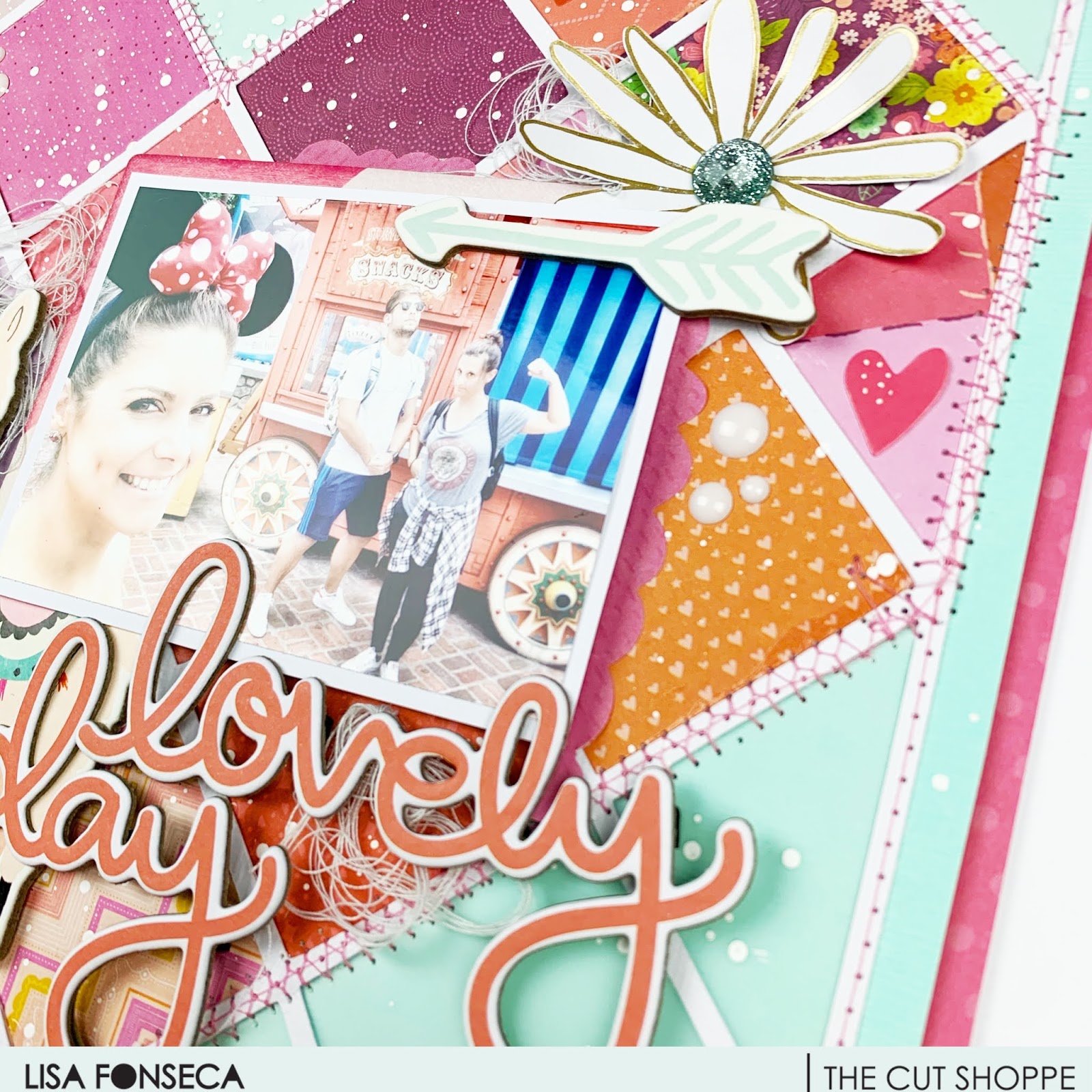
Lovely Day layout - Lisa Fonseca

Hey scrappy people,

it's Lisa and today I'm sharing a new layout, using the SQUARE OFF cutfile.


You can find the cutfile on the CUTSHOPPE website. 

When you look at the cutfile as is, you see this regular square pattern. When I looked at it a bit longer though, I could make out a heart in the middle, by filling only some of the squares. In fact, the very cool thing about this cutfile, is that you can fill any squares and make it look different every time. So there are many possibilities with this cutfile. 


To fill the squares, I wanted to use only reds, pinks, oranges and purples. The little 2x2 paper pads from Pink Paislee, are exactly the same size as were the squares of my cutfile. That was awesome. :) So I went through all of the Paige Evans collections and got out all of my swatch books. I chose all the ones that were in the colors that I needed. 


I backed all of the squares to create the heart shape and backed the rest of the squares with vellum (which you can't really see on the pictures...). Then I adhered the whole thing to a mint sheet of cardstock and started machine-stitching. I used a regular stitch on the borders and a zig-zag stitched all around the heart.

Then I created a frame for my layout, using a pink patterned paper from my stash.


To embellish, I didn't really had somethi ng specific in mind. So I went through a of things from my stash and chose a cardboard llama from Crate Paper, some fussy-cut flowers from Dear Lizzy, some cardboard words and arrows from My Mind's Eye (I think...;) and some other little bits. I matted my photo on some patterned paper and adhered it to the layout, using foam.


Then I added my chosen embellishments in a way that I liked and looked balanced to me. I also added some tangled thread to give the whole thing more detail and interest. 

To finish, I added some white splatters of paint.

I really hope you like it and are inspired to use that cutfile too. 

See you soon, 

Lisa

Sunday, February 23, 2020

Curl up with a Good Book | Mandy Melville

Hey friends!

Mandy here with you today to share a layout that I created using the Good Book cut file from The Cut Shoppe. My eldest daughter Abi is an avid reader, so this was the perfect cut file to use to document a photo I snapped of her recently while she was reading.


The Good Book cut file:

Good Book

I started by cutting the cut file out of white cardstock, and then backing it with patterned papers from the Felicity Jane Shay collection. I don't often use coloured patterned papers for my background, but I decided to use one this time, to help the cut file to really stand out against the background, and I like the subtle tone-on-tone stripes on this patterned paper. I backed the cut with craft foam before adhering it to the background to give it some extra dimension.


I added a couple of layers behind my photo using a 3x4 journaling card and a tag, and then adhered it over on the right hand side of the page. I fussy cut some pretty florals to embellish around the photo, and I also added a sub-title across the bottom of the photo using a die cut word from the Shay collection, and a little puffy word sticker.


To balance out the photo cluster over on the right hand side of the layout, I created a second cluster to the left of the cut file. I repeated elements in this cluster that I'd used in the main one including another fussy cut floral cluster and another little puffy word sticker. I also added a label here to record the book that my daughter was currently reading when I took the photo.


I finished the layout off with some typed journaling and a couple of chipboard asterisks.

Thanks so much for joining me here on the blog today! I hope that you enjoyed taking a look at my layout.

Thursday, February 20, 2020

Espresso Yourself | Vânia Fonseca

Hello crafty friends! 
Vânia here and today i´m sharing a 12x12 page that i made using the Espresso Yourself cut file from The Cut Shoppe.


I love coffe, and i couldn´t start my day without my expresso. So i made this layout to document my love for this small cup of coffee. 


I´m using a couple of different Maggie Holmes collections some bits and pieces from Heritage and some from Willow Lane.


I´ve start by cutting the file using white cardstock, then chose different patterned papers to back the cut file. I put my photo inside the letter O and create a little embellishment cluster around it. 


Also grab a couple of different stamp sets from my stash, coffe themed, and stamped a couple of phrases and fake coffee splatters in some of the letters.


To Finish the page i add a couple of stickers and some ink splatters to my page.
Thank you so much for passing by, see you soon!

Wednesday, February 19, 2020

Start Here Project Life | Kelly Janes

2020 is a new year and I was reevaluating how I want to scrapbook this year. I've decided to make a transition into Project Life. I thought a great place to start my 2020 album was with the Start Here Cut File.


I sized the Start Here Cut File in Cricut Design Space to fit on a 4x6 card. I backed the cut file with a light pink patterned paper and adhered the cut file to a 4x6 piece of patterned paper. I added this card to the top left corner of my spread. I love that the "R" in the cut file is an arrow. It's automatically moves your eye down to the rest of the spread. Once that card was finished I was ready to move onto the rest.


I used multiple photos in my spread along with multiple cards from the Citrus Twist January Kit. I love that I can add puffy stickers and layers onto my cards/photos! I'm really happy with how this spread came together...especially since this is my first Project Life layout EVER!


Don't forget to head to The Cut Shoppe Store to check out all of the available products! I can honestly tell you that these products can be used on any project! I've used cut files for cards, 12x12 layouts, in my planner, and now Project Life! So fun!!! If you want to read more on my thoughts of why I made this change then you can head to my blog to read more about this change.


Monday, February 17, 2020

Be Mine | Kelly Janes

Hey friends! Kelly back today with a new 12x12 Valentine themed layout. It's been awhile since I've created a 12x12 layout because I've been loving creating in my planner for the past 6 months or so. But I loved this photo of my husband so much that I wanted to highlight it on a larger scale.


I started in Cricut Design Space by "slicing" apart the FREEBIE FRIYAY Listen to Your Heart Cut File. I used a very vibrant patterned paper for my background, so I backed each row of hearts with vellum to help the hearts stand out from the background.


I tucked my photo under one of the rows of hearts for additional interest, and I then added a few clusterings of embellishments to help your eye dance around the layout. This layout was very simple, but I the cut file, vellum and different types of embellishments (puffy embellishments, die cuts, stitching, etc) adds so much interest to the layout!


Remember to visit The Cut Shoppe Store to check out all of the different cut files, classes and digital products!


Sunday, January 19, 2020

The Best Dad | Mandy Melville

Hello everyone!

Mandy here today to share a layout using the new Geo Frame cut file from The Cut Shoppe. I documented a recent photo of my hubby with my son, and I wanted to make this layout about how I think Andrew is an awesome Dad to our kids!


Geo Frame

I started my layout off by trimming down a sheet of white cardstock to about 9 1/2 inches square, and I adhered it to the middle of a patterned paper from the Cocoa Vanilla 'Boys Rule' collection. I hand-drew a border around the white cardstock to help it to stand out a little more. I then cut the cut file out of a sheet of grey patterned paper from the same collection, and positioned it over the white cardstock. This provided a great frame for my photo, as well as adding some more interest to the background.


I added lots of layers under my photo using patterned papers, as well as a chipboard frame to help it to really pop off the page. I then adhered it over on the right hand side of the cut file. On the bottom corner of the photo I added a flair button, as well as a die cut arrow.


For my title I combined some Cocoa Vanilla chipboard words with scripty alphabet stickers from Felicity Jane. I love combining different fonts to create my titles!


I finished the layout off with some little word stickers, a few chipboard crosses, and a couple of wood veneer stars.


Thanks so much for joining me here on the blog today! Make sure you pop on over to The Cut Shoppe to check out the other new designs that are available!


Thursday, December 12, 2019

Come Let Us Adore Him | Mandy Melville

Hi everyone!

Mandy here with you today to share a Christmas themed layout that I created using the new Adore Him cut file, available to purchase from The Cut Shoppe! Christmas is my favourite time of the year, and I love capturing all of the joy and excitement as we celebrate the birth of Jesus!


Large titles like this are one of my favourite types of cut files to use on my layouts! I think they look really effective, and draw the viewer into the page, and they also make the design process really easy!

Adore Him

I started my layout off by backing each of the letters in the cut file with patterned papers from the Felicity Jane Noel collection. I then adhered the cut file to the background using foam tape to give it lots of dimension.


I printed my photos slightly smaller than 3x4 inches, leaving a thin white border around them. I then then matted them with a woodgrain patterned paper and tucked them into the spaces around the title.


I embellished my page with some die cuts, a few fussy cut poinsettias, and gold puffy stickers, all from the Noel collection. And to finish it off I added some typed journaling strips.


Thanks so much for joining me here today! I hope that you enjoyed taking a look at my layout, and make sure you go grab this cut file from The Cut Shoppe to use on your Christmas projects!