Showing posts with label Cricut. Show all posts

Wednesday, February 19, 2020

Start Here Project Life | Kelly Janes

2020 is a new year and I was reevaluating how I want to scrapbook this year. I've decided to make a transition into Project Life. I thought a great place to start my 2020 album was with the Start Here Cut File.


I sized the Start Here Cut File in Cricut Design Space to fit on a 4x6 card. I backed the cut file with a light pink patterned paper and adhered the cut file to a 4x6 piece of patterned paper. I added this card to the top left corner of my spread. I love that the "R" in the cut file is an arrow. It's automatically moves your eye down to the rest of the spread. Once that card was finished I was ready to move onto the rest.


I used multiple photos in my spread along with multiple cards from the Citrus Twist January Kit. I love that I can add puffy stickers and layers onto my cards/photos! I'm really happy with how this spread came together...especially since this is my first Project Life layout EVER!


Don't forget to head to The Cut Shoppe Store to check out all of the available products! I can honestly tell you that these products can be used on any project! I've used cut files for cards, 12x12 layouts, in my planner, and now Project Life! So fun!!! If you want to read more on my thoughts of why I made this change then you can head to my blog to read more about this change.


Monday, February 17, 2020

Be Mine | Kelly Janes

Hey friends! Kelly back today with a new 12x12 Valentine themed layout. It's been awhile since I've created a 12x12 layout because I've been loving creating in my planner for the past 6 months or so. But I loved this photo of my husband so much that I wanted to highlight it on a larger scale.


I started in Cricut Design Space by "slicing" apart the FREEBIE FRIYAY Listen to Your Heart Cut File. I used a very vibrant patterned paper for my background, so I backed each row of hearts with vellum to help the hearts stand out from the background.


I tucked my photo under one of the rows of hearts for additional interest, and I then added a few clusterings of embellishments to help your eye dance around the layout. This layout was very simple, but I the cut file, vellum and different types of embellishments (puffy embellishments, die cuts, stitching, etc) adds so much interest to the layout!


Remember to visit The Cut Shoppe Store to check out all of the different cut files, classes and digital products!


Tuesday, November 19, 2019

Together Falala | Kelly Janes

Hey friends! Kelly back today with a new 12x12 scrapbook layout using the Boughs of Holly Cut File (which was a freebie cut file from 2017).


I don't normally scrapbook out of season, but I've been feeling festive early with all of the December Daily goodness that is being posted lately. I used an older collection from Basic Grey to cut the cut file and then positioned the cut file on another patterned paper. The cut file was blending in a little too much on the background, so I added black hand-stitching around the entire cut file to help it pop.


I then moved onto embellishing. This Basic Grey collection is several years old, and I don't have any die cuts from the collection. I only have the chipboard and sticker sheet. Thankfully the new Pink Paislee Christmas Collection die cuts matched! I added all of those embellishments around the layout and my photo. I am so happy with how this turned out. It's very minimalistic, but I love all of the different textures and dimension!


The Cut Shoppe Store is full of great cut files, digital stamps and much more! Be sure to check it out!


Sunday, October 13, 2019

Happy Halloween | Kelly Janes

Hey friends! I'm so excited to be back for a new term with The Cut Shoppe! It's my favorite time of year and I have one of my favorite types of layouts to share with you today...a Halloween layout! YAY!


I used the Tangled Web Cut File on a project years ago and still had a large piece of it left over. When I was sorting through my Halloween supplies the cut file was laying on top of this Halloween themed patterned paper from Echo Park. I loved how it looked so the start of my layout was complete!


I added a little baker's twine to the layout in a few places on the cut file and then adhered it to the layout. I embellished the layout using die cuts, stickers, glitter chipboard shapes and anything Halloween themed I could find! HA!


Halloween layouts are so fun and I can't wait to make more! There are so many cut files in The Cut Shoppe Store (including great Halloween cut files!!), so be sure to visit to check out the cut files, digital stamps, classes and more!

Monday, September 30, 2019

Corn Maze | Kelly Janes

Hi everyone! Kelly here today with a new 12x12 scrapbook layout using the Crop Circles Cut File.


I sized the cut file so my 4" photo would fit in the center of the circle. I then cut the cut file on a piece of patterned paper from the Paige Evans Whimsical Collection. I added the cut file to another piece of pink patterned paper from the same collection.


I then moved onto embellishing. Wreaths have been one of my favorite types of layouts for some time and I knew I wanted to put a spin on that theme using the Crop Circles Cut File. I tucked a bunch of floral die cuts and puffy stickers into the cut file. I also added a few die cut hearts just to add a mix into the embellishing.


I added the title around the top left part of the circle, and added a few lines of journaling under the cut file. I'm in full Fall swing so be on the lookout for more Fall themed layouts in the very near future! The Cut Shoppe has great cut files for all seasons so be sure to check it out!


Friday, August 30, 2019

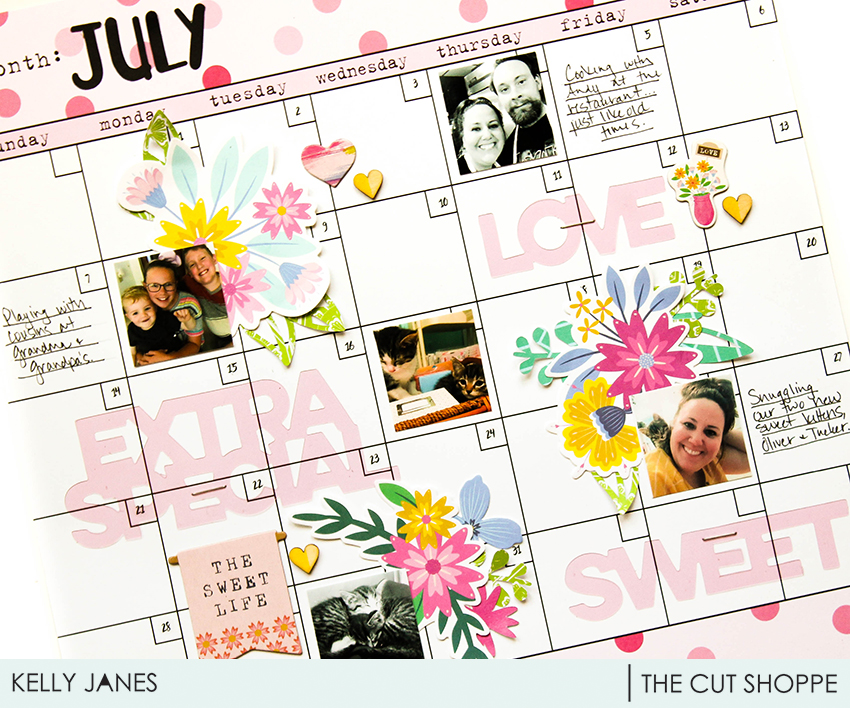
July Calendar

Hey friends! Kelly back today with a new layout using two cut files, Flower Delivery & Brush Up Alpha.


I love cut files because they can be used as large focal points on a layout or they can be used as subtle embellishments; which is what I've done today. I recently discovered the Happy Planner and will be using one as a type of Project Life documenting. I was messing with my printer settings so I had a couple sheets of July photos. I stumbled on a calendar patterned paper from Bella Blvd and thought it would be perfect to use; especially since I'm currently loving planner style documenting!


I positioned my photos on the layout and then grabbed a few floral die cuts. I cut leaves and a pink flower from the Flower Delivery Cut File on patterned paper and tucked them in with the die cuts to add extra pops of color.


There was also an area for the month at the top of the 12x12 patterned paper, so I cut "July" from the Brush Up Alpha Cut File on black cardstock. I added my journaling and a few more embellishments to finish the layout.


I absolutely love the versatility of cut files! A large focal point or using them as die cut type embellishment can make such an impact on a layout or project! Don't forget to visit The Cut Shoppe Store to check out all of the cut files, classes, and digital stamps!


Wednesday, July 31, 2019

Poolside | Kelly Janes

Hey friends! Kelly back today with a new layout using an exclusive cut file that was available in the most recent Cut Shoppe Newsletter.


I started by cutting the Poolside Cut File on white cardstock. I then backed the words using different 6x6 patterned papers from the Fancy Pants Poolside Collection. I added machine stitching to the wreath portion of the cut file and hand-stitching around the words to help them stand out from the background.


I started by just adding white embroidery floss, but I didn't feel like the words stood out enough. So, I added pink embroidery floss on top of the white embroidery floss. That was a lot of hand-stitching, but I love the look!


I adhered the cut file to a pink patterned paper and added a mix of embellishments from the same scrapbook collection around the edges of the cut file. I tucked a few of the embellishments under the wreath portion and on top of the cut file for added dimension!


You want to make sure that you are signed-up for The Cut Shoppe Newsletter (see the right sidebar on TCS blog). The newsletter is sent directly to your inbox twice a month. These cut files are released randomly and are only available in the newsletter! Don't miss out on the next FREE newsletter cut file, but until then you can check out all of the cut files available in the shop!


Wednesday, July 17, 2019

Mug Shot | Kelly Janes

Hey everyone! Kelly here today to share a new layout using the Java Script Cut File.


I started in Cricut Design Space by using the "contour" feature to hide the words in the coffee mug. I then took one of the hearts from the steam and duplicated it. I resized the heart and "sliced" it in the center of the mug. I then cut the mug on a piece of ombre patterned paper from Pinkfresh Studio.


I took a piece of white cardstock and added some mixed media and stamping. I positioned the mug in the center of the layout after I added hand-stitching around the outside edge of the cut file. I then added numerous floral die cuts to make it look like they were coming out of the mug.


I added my photo to the left of the cut file and positioned my title on the mug. I added my journaling with a white pen at the base of the mug; along with white splatters. I thought the edges of the layout looked a little bare, so I cut messily along the edges and added a pink patterned paper.

This layout was so fun to put together! Coffee & my dogs are two of my favorite things!


Wednesday, June 19, 2019

Life Skill | Kelly Janes

Hey friends! Kelly here today to share a new layout using the Shining Star Cut File from The Cut Shoppe Store!


I started by sizing the cut file to 11.5" in Cricut Design Space and cut the cut file on a piece of white cardstock. I pulled the positive piece of the cut file (the image you see above) and just used the negative pieces (the pieces you would normally throw away) for my layout. I also used the star from the cut file as a template to trim my 3.5" photo into a star shape.


I went through my ribbon stash and grabbed a rainbow of colors. I then lightly attached the ribbon the the negative pieces of the cardstock using tape runner, and then stitched along the edge of each piece of paper. I also added hand stitching between each of the negative pieces of the cut file.


I decided to leave one of the spaces empty for my title and journaling. I taped that piece of the cut file to a scrap piece of paper and ran it threw my WRMK Typecast Typewriter to ensure that I would have perfect placement of the journaling. I added my title using Thickers from my stash.


I really debated on whether or not to embellish the layout any further. I felt like there was already so much going on with the different color ribbons, but decided to add a small clustering of embellishments in a few areas on the layout...staying with the tone on tone technique.

This layout was so fun to put together and I love thinking outside the box when it comes to using cut files! Have you ever tried to use just the negative pieces of a cut file?!