Showing posts with label Pinkfresh Studio. Show all posts

Thursday, November 14, 2019

Pumpkin Patch | Tarrah McLean

Hi Cut Shoppe friends!


It's Tarrah back with you and today I am sharing a new layout using the Pumpkin Patch cut file. This cut file is gorgeous for Fall/Autumn themed projects! I have teamed it with the soft and pretty 'Just a Little Lovely' collection by Pinkfresh Studio.


Pumpkin Patch

I started out by backing the title in a soft pink paper and then backed the main part of the pumpkin with another of the soft papers. The stalk and leaves were backed using 2 of the papers from the 6' x 6' paper pad. I then added craft foam underneath and adhered to the background paper. 

I placed my photo up in the top right of the pumpkin and layered some of the 6'x 6' papers from the paper pad underneath the photo. I also added one of the dimensional banner stickers under the photo. I also added one of the wood beads to the centre of the 'p' in 'Pumpkin'.

The florals in this collection are gorgeous, I added one of them to the top left of the pumpkin and also added some of the gold glitter enamel dots to the centres of the flowers. I also added a small single flower above the floral cluster.

Thank you so much for stopping by today! I hope you have been inspired by layout? Make sure to check out The Cut Shoppe store for the Pumpkin Patch cut file so you can use it your next project!

Happy creating!

Saturday, September 14, 2019

Beginning Preschool | Kelly Janes

Hey there friends! Kelly back today with a new 12x12 layout using a previous Freebie Friyay Cut File, Summer Adventure.


I started in Cricut Design Space by hiding all of the letters within the cut file, using the contour feature. I then resized the image and cut it on a piece of patterned paper from the Pinkfresh Studio Office Hours Collection.


I then placed the cut file onto another piece of patterned paper from that same collection. I wanted the cut file to stand out a bit more from the background, so I used white gesso on the background paper to soften the design. I then moved onto embellishing.


I added quite a few embellishments from the Pinkfresh Studio Office Hours Collection that fit the theme of my photo that was taken at my son's preschool orientation. I had quite a bit of journaling for this layout so I took full advantage of the design of the cut file. I used the top portion of the banner for the title and then the other two curves for my journaling. I sometimes struggle with where to put my journaling on a layout, and the cut file really made the positioning easy!


Be sure to head to The Cut Shoppe Store to check out all of the cut files, stamps, digital stamps and class! There are so many fun designs!


Friday, August 30, 2019

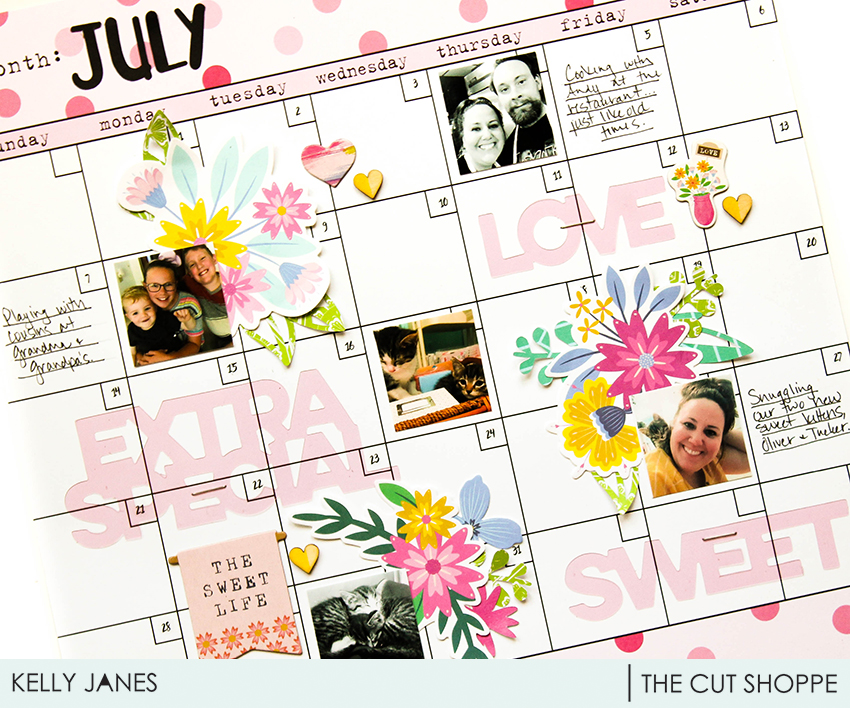
July Calendar

Hey friends! Kelly back today with a new layout using two cut files, Flower Delivery & Brush Up Alpha.


I love cut files because they can be used as large focal points on a layout or they can be used as subtle embellishments; which is what I've done today. I recently discovered the Happy Planner and will be using one as a type of Project Life documenting. I was messing with my printer settings so I had a couple sheets of July photos. I stumbled on a calendar patterned paper from Bella Blvd and thought it would be perfect to use; especially since I'm currently loving planner style documenting!


I positioned my photos on the layout and then grabbed a few floral die cuts. I cut leaves and a pink flower from the Flower Delivery Cut File on patterned paper and tucked them in with the die cuts to add extra pops of color.


There was also an area for the month at the top of the 12x12 patterned paper, so I cut "July" from the Brush Up Alpha Cut File on black cardstock. I added my journaling and a few more embellishments to finish the layout.


I absolutely love the versatility of cut files! A large focal point or using them as die cut type embellishment can make such an impact on a layout or project! Don't forget to visit The Cut Shoppe Store to check out all of the cut files, classes, and digital stamps!


Sunday, August 11, 2019

Grateful Heart | Marsha Farris

Hey friends!  Marsha here today with a fun traveler's notebook layout.  I used the new Background Check TN Decorative Page cut file from The Cut Shoppe.


For this layout, I mainly used the Everyday Musings and Joyful Day collections by Pinkfresh Studio.  To begin the spread, I cut out the frame portion of the cut file using white cardstock.  I then backed each section with a different patterned paper from the 6x6 paper pads.  The smaller patterns in these paper pads are perfect for backing cut files!  Next, I adhered the cut file to a piece of woodgrain patterned paper and a cardstock base, trimmed to fit in my album. 

I added ephemera, cardstock stickers, and puffy stickers to embellish the frames, using foam dots to add dimension to some of the pieces.


For the other side of the layout, I layered patterned papers behind my photo and used ephemera and puffy stickers to embellish around the photo.  

A white acrylic piece from Color Cast Designs, layered over a tag, worked perfectly as a title for the spread.


I love how this page came together using this traveler's notebook cut file!  

Thank you for joining me today!  I hope you will check out this and the other fun cut files available in The Cut Shoppe store!


Thursday, August 8, 2019

NEW CUT FILES | Back to School Bash

Can you believe it's already time for back to school??!!  You're either ready to get those kids back with their teachers, or hoping to hang on to summer days a little bit longer.  We homeschool, so mine are with me 24/7!  HA!  Since we homeschool, I don't always have the usual school photos, but I just had to use the NEW School Days cut file.  Thankfully, we had the chance to help out on one of our church campuses last weekend with a backpack giveaway for kids in the community, and I made sure to snap a couple of photos.


https://thecutshoppe.com.co/collections/new-designs/products/school-days

When I sat down to work on the layout, I remembered having a kit from Freckled Fawn, that I bought last year that would work perfectly for a school themed layout.  All of my patterned papers are from the kit, and I love the way the burst patterned paper looks behind the backpack cut file.  Since I had cut the cut file from white cardstock and had such a bold paper backing it, I wanted something subtle behind it, but not solid white.  You can imagine how excited I was to have the fun notebook paper to use for my background!


Even though the papers from the Freckled Fawn kit worked with the school theme, most of the embellishments did not.  So I decided to dip into my Pinkfresh Studio Office Hours collection.  I looked for pieces that would coordinate with the colors in the burst paper and found quite a bit.  I created a photo cluster on the right hand side with some of the embellishments and then made another embellishment cluster on the left hand side, that included my journaling.


I needed something for my title, and had these black and white Thickers in my stash.  They work great with any collections, and I love the contrast with the bright colors.  The spacing worked out perfectly to add the title on the lower portion of the backpack.  

I hope you'll stop by The Cut Shoppe store and pick up the School Days cut file.  And while you're there, make sure you check out our other new designs that are now available!

https://thecutshoppe.com.co/


Wednesday, July 17, 2019

Mug Shot | Kelly Janes

Hey everyone! Kelly here today to share a new layout using the Java Script Cut File.


I started in Cricut Design Space by using the "contour" feature to hide the words in the coffee mug. I then took one of the hearts from the steam and duplicated it. I resized the heart and "sliced" it in the center of the mug. I then cut the mug on a piece of ombre patterned paper from Pinkfresh Studio.


I took a piece of white cardstock and added some mixed media and stamping. I positioned the mug in the center of the layout after I added hand-stitching around the outside edge of the cut file. I then added numerous floral die cuts to make it look like they were coming out of the mug.


I added my photo to the left of the cut file and positioned my title on the mug. I added my journaling with a white pen at the base of the mug; along with white splatters. I thought the edges of the layout looked a little bare, so I cut messily along the edges and added a pink patterned paper.

This layout was so fun to put together! Coffee & my dogs are two of my favorite things!


Sunday, April 28, 2019

Let’s Go | Iris Fox

Hello fellow cut file fans! I’m here to share a Traveler’s Notebook sized full photo that features one of the phrases from the Let’s Talk Summer set.

I’ve been on a full photo kick lately and just recently started my Maui travel album.  When thinking about the title page for the album, my mind turned to some of the wonderful travel phrase cut files in The Cut Shoppe.  I’m particularly smitten with the ones that are open alphas, and picked the "let’s go" phrase.  

I printed my photo and cut it down to 4.25 inches wide by 8.25 inches tall. I cut the phrase to the size it actually opens up at, just over 3 inches wide.  This let me place it in the “dead” space at the bottom of my ocean sunset perfectly.  


I backed the letters using 6x6 papers from the Pinkfresh Studio Out and About collection.  That’s one tip - all those 6x6 paper pads we’ve collected work perfectly for backing cut files!  I love that the scale of the patterns gives the smaller letters lots of fun interest.  After adding a few other embellishments from the collection, I realized the white cut file really stood out too starkly.  To tone it down and help it blend with the other embellishments, I stitched the outline in a teal thread.  This was the perfect touch!


Using the Pebbles From Me to You roller stamp, I stamped "Maui" and "2009" in a soft grey to blend in a bit with the clouds. I will note, I’d forgotten the album I’m using is for 3x8, so the TN size was a little wide.  I went back and trimmed the width another 1/8 inch.  Learn from my mistakes people! ðŸ˜‰


Go check out all the fun travel cut files in the shop and try using some cut files on top of full photos.  You’ll love how they really pop!

Thanks for stopping by and pop over to my Youtube Channel to see the process video


Saturday, April 13, 2019

Egg Hunt | Marsha Farris

Hey TCS friends!  Marsha here with you today sharing a layout in my traveler's notebook.  I used the new Egg Hunt Cut File from The Cut Shoppe.


I thought this cut file would pair perfectly with the Everyday Musings collection from Pinkfresh Studio.  To begin my spread, I resized the cut file to fit in my traveler's notebook and cut it out on white cardstock.  I backed both words with different patterned papers from the collection.  Next, I trimmed the file in half using my paper trimmer, so it would fit in my TN.

For this layout, I chose a photo of my youngest son taken a couple of years ago at a church Easter egg hunt.  He has always loved hunting eggs, but this year he decided that he had rather eat the candy, than hunt more eggs!  I adhered my photo to a glassine bag and created a tag to slip inside for my journaling.  This is a great way to include journaling, but it not be a feature on the page.


Next, I created three embellishment clusters around the page using ephemera and puffy stickers.


To finish off the spread, I added some blue watercolor splatters.


Thank you for stopping by today!  I hope you will check out all of the fun, new cut files available at The Cut Shoppe!


Sunday, March 31, 2019

happiness is a marshall mini-stack | orange gearle

Hi!  Orange Gearle here with a fun, colorful layout using the Swirly & Twirly cut file. I grabbed a bunch of different Pinkfresh Studio collections (Out and About, Everyday Musings, and Joyful Day) and mixed and matched and came up with a rainbow of color!


Here is what the Swirly & Twirly cut file looks like in the shop. 


I cut it first using white card stock.  Then, in the Silhouette software, I deleted all of the middle parts, and cut the outer part of the file using the rainbow paper from Out and About. This made it super easy to back the file!


The cut file inspired me to find all the circles and add them to my layout!  I used a few different sizes of circle punches, as well as circle embellishments to add clusters of circles throughout the page. 


I popped up some of the circles with craft foam, and I also added some flair from {a flair for buttons} in each of the clusters.  This helped add some fun textures and dimension. Here are a few more close ups. 


I also made a video of my process if that's something that suits your fancy!


Thank you so much for stopping by! See you again soon! XO o.g.