Showing posts with label Stars. Show all posts

Wednesday, January 15, 2020

Best Pals- Thin Line Alpha Cut File- Audrey Yeager

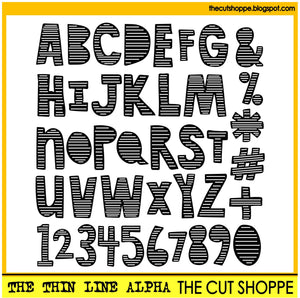
Hi everyone!  I went through the store to find a fun alpha to use on my boy page (and there are LOTS to choose from!  I went with The Thin Line Alpha and cut the word "Pals" on my page below:


The Thin Line Alpha

This page was also a stash buster!  I first went through my stash to find some colors that I wanted to use.  I was struggling at first with a page design, but one of my goals was to use more patterned paper.  So I just layered some big rectangles of the patterns I liked with the photo on top in a frame.


Then I fussy cut out some stars and others from my stash.


Circle embellishments on the edges help soften the flow of the design.


Some details with border stamps and machine stitching.


Finally, the cut file I used to cut the word "Pals".  I was worried that cutting the letters this size with all the detail they have would be tricky, but they cut so beautifully from patterned paper!


Thanks so much for looking and go check out all the Alpha Cut Files in the store!


Wednesday, August 28, 2019

Extraordinary | Tarrah McLean

Hi Cut Shoppe friends,

It's Tarrah back with you and today I am sharing a new layout using the awesome new Extraordinary cut file


Extraordinary

I cut the design out from white cardstock and then added some craft foam underneath the cut file and stuck it down onto another piece of white cardstock. I also cut out all the insert pieces from the patterned papers with the Cameo so that I could add them back in. 

I just love the depth and shadows the cut file design gives from the dimension from the pop dots, its an effective look with the patterned papers sitting flat on the background too. I added a photo of my littlest man to the biggest star at the bottom. This boy is exactly that too....Extraordinary! He is the dream child, always thinking of others, kind, loving, smart and funny! The Teen Spirit collection by Echo Park paper was perfect to put with this cut file. I love the bright colours against the white of the cut file design.

I kept the embellishing minimal because of the title taking up lots of room and being one of the main focal points. I added a few phrase sticker, die-cuts, enamel dots, cork shapes and wood veneer pieces to enhance the design. Some of the die- cuts I did pop up but others I added just flat to the page.

Thanks so much for stopping by today! I hope I have inspired you to create a project using one of the awesome large title cut files in The Cut Shoppe...there are loads to choose from so go and check out the store!

Happy creating!

Monday, April 29, 2019

Lil' dude | Sasha Biyanova

Hey everyone!

It's Sasha here today with my layout using two cut files!


The main theme of the layout is made from the Space cadet file! We had some problems with electricity when I tried to cut this file somy plotter had to stop the operation! But I decided to use it any way and divided to the parts)


And I chose The Boy mom cut file for the title! It's simply perfect!


Love how it's going together)))


Hope, you were inspired!
Happy crafting!

Monday, March 25, 2019

Colorful | Tarrah McLean

Hi Cut Shoppe friends!

It's Tarrah McLean back with you and today I am sharing a colorful and bright layout using one of the brand new cut file sets now in The Cut Shoppe store!

The Lucky Stars cut file below is a very versatile one to use for all kinds of different themed projects! You could also try cutting this out and then using the positive stars/pieces to create a fun look. 
Lucky Stars

I cut The Lucky Stars cut file out from white textured cardstock and then backed the cut file with one of the super colorful papers from the Fancy Free collection by Paige Evans. I love how all the stars have different colors and I did not have to back every single star with a different paper!!! The paper I chose did all the hard work for me! 

I kept the embellishing fairly simple so the photo and the stars could be featured the most! I chose a chipboard title for underneath the photo that went perfectly with the layout. I layered one of the tags from the Fancy Free collection underneath my photo and also added one of the wood tabs above the photo. I like how these embellishments draw some colour in to the photo.

The puffy stickers in this collection are also really cute, I added one of the stars and some of the crosses around the page. I tried to create a tone on tone look with the crosses. I love the cute buttons in this collection so I added one of the aqua ones to the right of my photo.

Make sure to check out The Cut Shoppe store for all the gorgeous cut file designs! There are so many gorgeous ones you definitely need in your life! 

Happy creating!

Thursday, January 31, 2019

Birthday Banner | Kelly Janes

Hey crafty friends! Kelly here today to share a new birthday themed layout using the Let's Party Cut File.


I started in Cricut Design Space by sizing the Let's Party Cut File to 11.5". I then inserted a star shape, sized the star to roughly .75" and duplicated the star numerous times. I positioned the cut file on a scrapbook layout template, in Cricut Design Space, and then arranged the tiny stars around the cut file. I "attached" the stars and then sent the images to the cutting mat.


I cut the cut file banner on a blue patterned paper from the Crate Paper Hooray Collection and the tiny stars on a piece of white cardstock. I layered the white cardstock with the stars on another sheet of white cardstock for a tone-on-tone look. I also cut out the center banner from the cut file to create 4 rows (instead of 5).


I tucked my photos under one of the banners and added a few embellishments before stitching down the banners. I added multiple birthday themed embellishments from the same Hooray Collection and a bit of journaling to complete the layout.


I'm hoping to have the YouTube Process Video for this layout on my YouTube channel this weekend so be sure to head there to see how this layout came together (including the Cricut tutorial!).

Remember to visit The Cut Shoppe Store to check out all of the cut files and digital collections!


Saturday, January 2, 2016

Goodbye 2015, Hello 2016

Hello everyone, Julie back with you today & let me start by wishing you all a happy new year, or should that be scrappy new year as I’m sure all who read this are into scrapbooking J I have choose to do a different layout today using the Hello 2016 cut file.


I did not have a photo for this layout so decided to go ahead & scrap without one thinking that this could be the first page of a new album or you could always add a photo later when you have one that suits. I started by cutting 2 papers diagonally & tearing a small piece out of the middle of each which I distressed & curled up. I added these papers to a piece of cardstock adding a piece of vellum behind the gap in the middle. I sewed around the whole page using gold thread & glued the cut files to the page, goodbye 2015 on the top left, celebrate in the middle & hello 2016 to the bottom right. I added a few flair badges, some stars & a few gold mist splatters.


Thanks for stopping by today & again hope you have a happy new year xoxo


Sunday, December 7, 2014

Santa's List

Hi there, Mary-Ann here to share my recent Christmas creation combining two of my favorite files from the shop!  In my small town, they host a festival of trees.  You have never before seen so many trees under one roof, I promise!  It is truly amazing.  Santa just happened to be there the same day as us!  Here is one of the photos I captured of my boy, intently listening and talking to Santa.   This may even be our Christmas card this year.


For the background, I chose the Winter Wishes 12x12 and my gold sketch pen.  After the sketching was complete, I deleted all of the unwanted words from the background and enlarged several of the stars for the gold and vellum stars you see scattered around my layout.  


Here is the most current wish list for Santa.


I printed "Santa's List" from The North Pole cut file and added it to the center of the frame.  

Here are the cut files  I used on this layout and where you can find them in the shop.


Are you participating in the 12 Days of Christmas with us?  If your just tuning in, be sure to head HERE for all of the details on how you can win one of our giveaways!
Don't forget to use this amazing discount code throughout the month of December for 25% off each order! Use it as many times as you want!

See you again real soon!  Happy Holidays.